
Pet owners · full guide · 5 min
How do you book a vet appointment online?
Short answer : Search for a vet by town or city, open their profile, pick a free slot in their calendar and confirm. You can book at any hour, and you receive a notification at each stage.
Booking a vet on Vetzy takes a few minutes: you search, pick a slot that is genuinely free in their calendar, and receive confirmation by email. Here is the exact journey, screen by screen, with what you can adjust and what depends on the vet.
And in Vetzy?
Vetzy lets you book appointments online with registered vets, with notifications when an appointment is created, changed or cancelled.
Book at any hour
The vet's profile stays open overnight: you choose your slot when it suits you, without waiting for the practice to open.
Realistic slots
Slots depend on the vet's opening hours and on the time set aside for each type of consultation.
Stay informed
You receive a notification when the appointment is created, changed or cancelled by the practice.
Book in 6 steps, without phoning
The screenshots come from the app, using demo data.
-
Step 1 · Owner
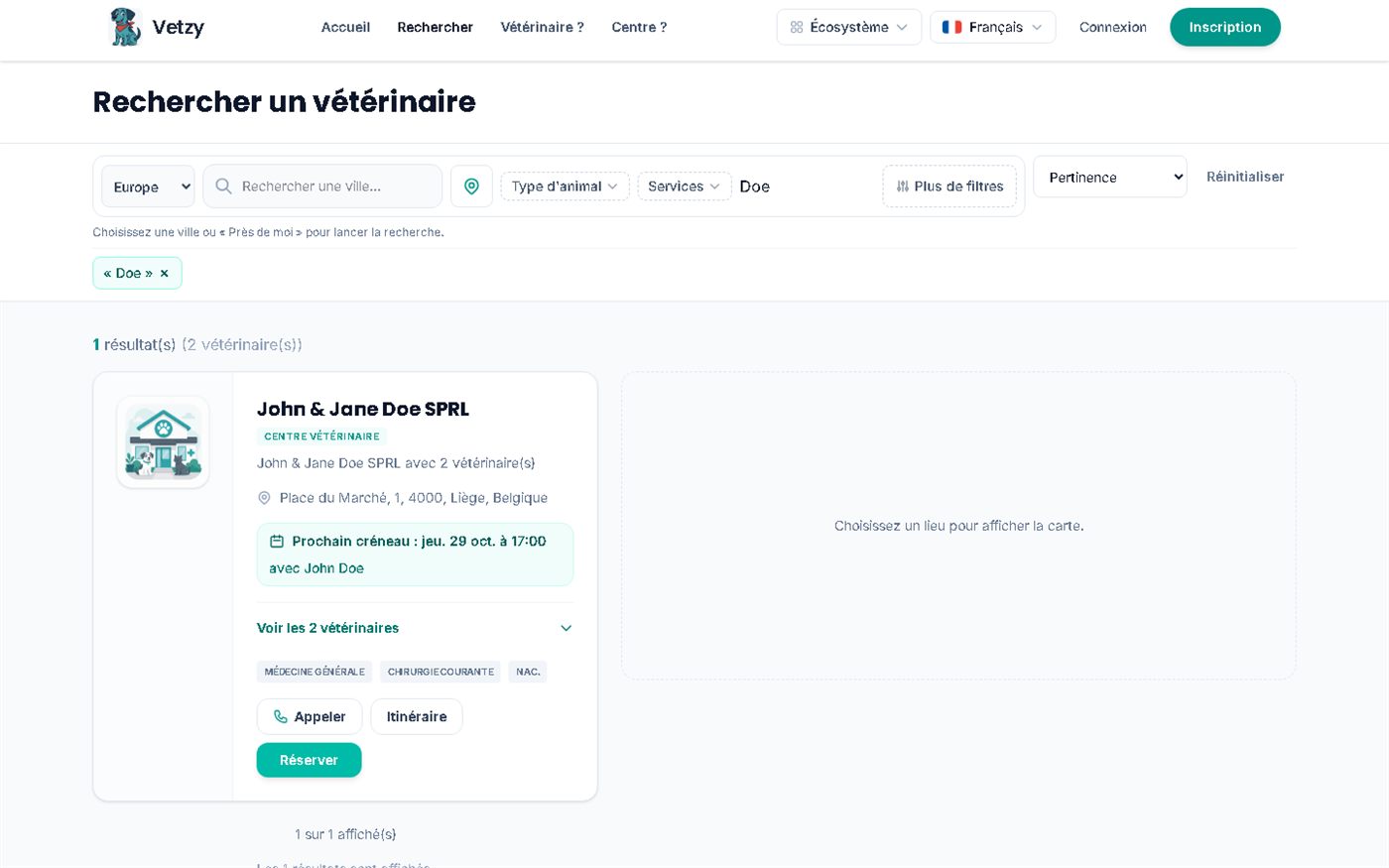
Search for a vet near you
AvailableOn the Search page, enter your town or city or search near your location, then refine by type of animal and by service. Each result already shows the next free slot and a Book button.
Some profiles are in "directory" mode: you can see their contact details, but online booking is not open.
Markers on the screenshot
- 1Town or city, or "near me", to start the search
- 2Filter by type of animal (dog, cat, exotic pets…) and by service
- 3Next available slot, visible before you even open the profile
- 4Book straight from the list
Screenshots of the app (demo data)
-
Step 2 · Owner
Open the profile and start the booking
AvailableThe profile presents the vet: specialities, languages, services, experience. If online booking is open, the Book an appointment button appears. Log in to your owner account to continue.
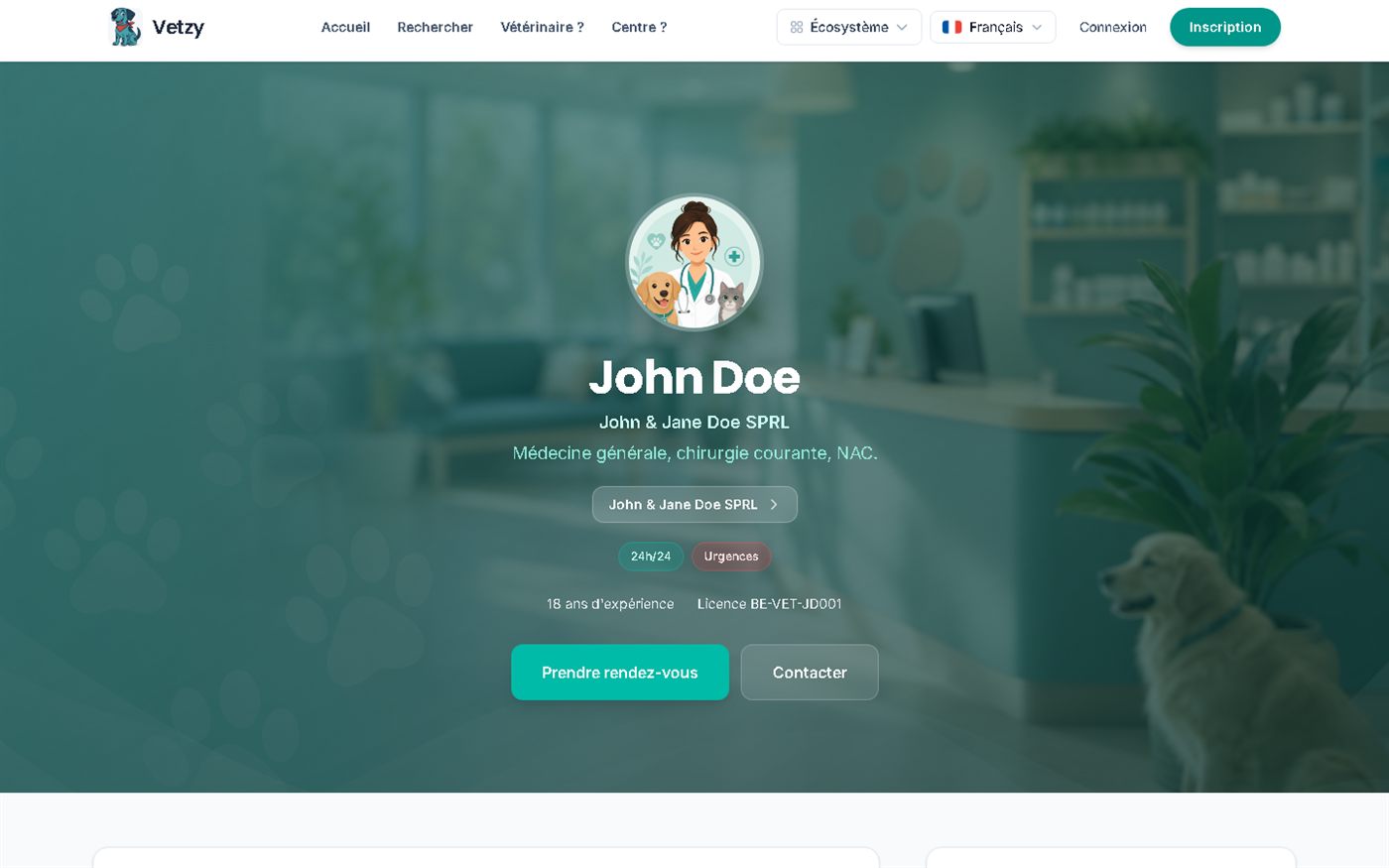
Markers on the screenshot
- 1The vet's specialities (general medicine, surgery, exotic pets…)
- 2Practice information badges, for example emergencies
- 3Book an appointment: opens the 3-step assistant
Screenshots of the app (demo data)
-
Step 3 · Owner
Choose the animal, the type of consultation and the reason
AvailableThe assistant guides you through three steps: the animal, the type of consultation, then the slot. You state the reason so the vet can prepare for the consultation, and you see the first available appointment for each vet at the practice.
The appointment type determines how long the slot is: the length is set by the vet.
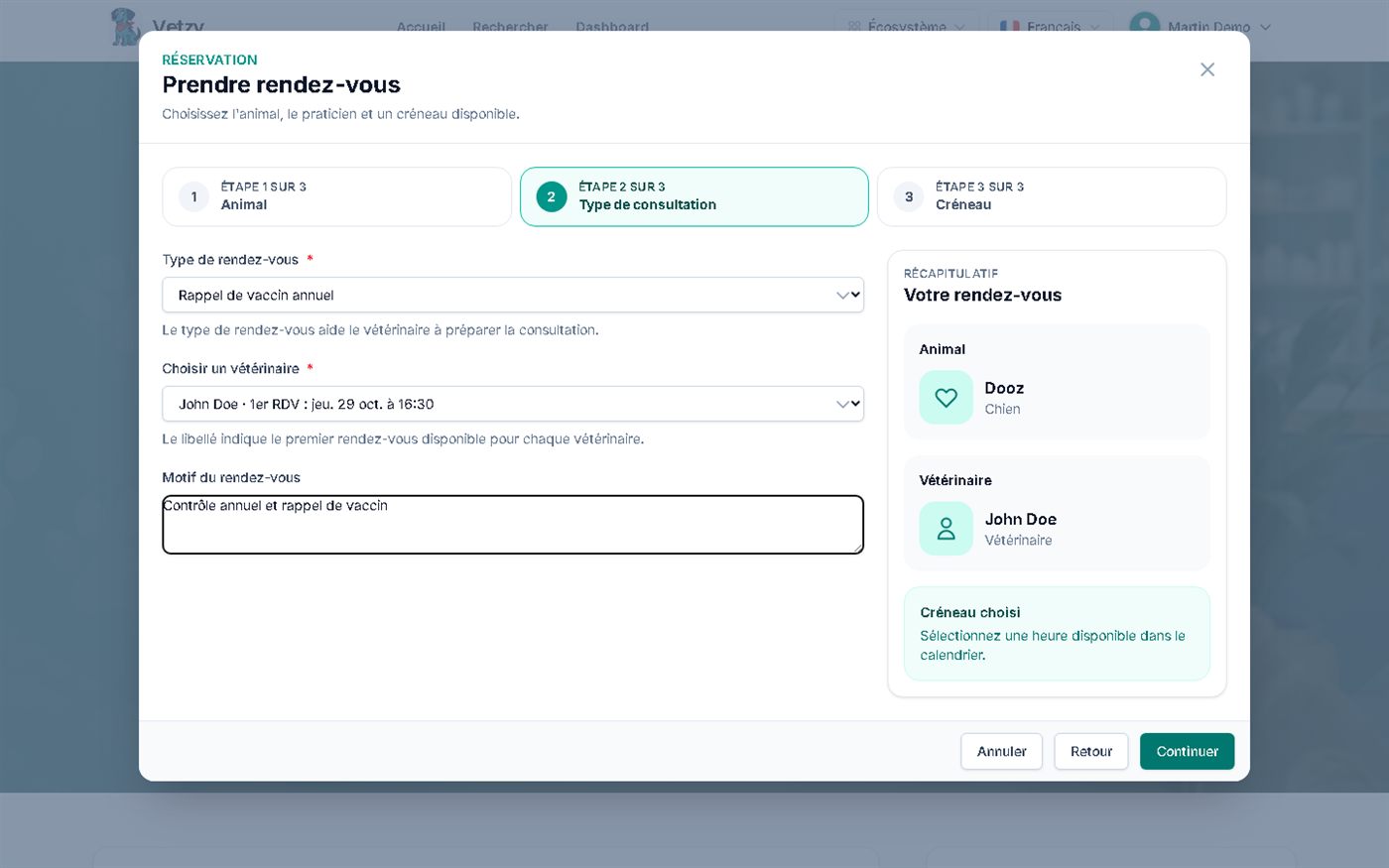
Markers on the screenshot
- 1Progress: animal, type of consultation, slot
- 2Appointment type (for example annual vaccine booster)
- 3Vet, with their first available appointment
- 4Free-text reason, to prepare the consultation
- 5Summary of your appointment, updated at each step
Screenshots of the app (demo data)
-
Step 4 · Owner
Pick a free slot during the week
AvailableThe weekly calendar only makes genuinely free times clickable: past or already taken times are struck through. A button takes you straight to the first available slot.
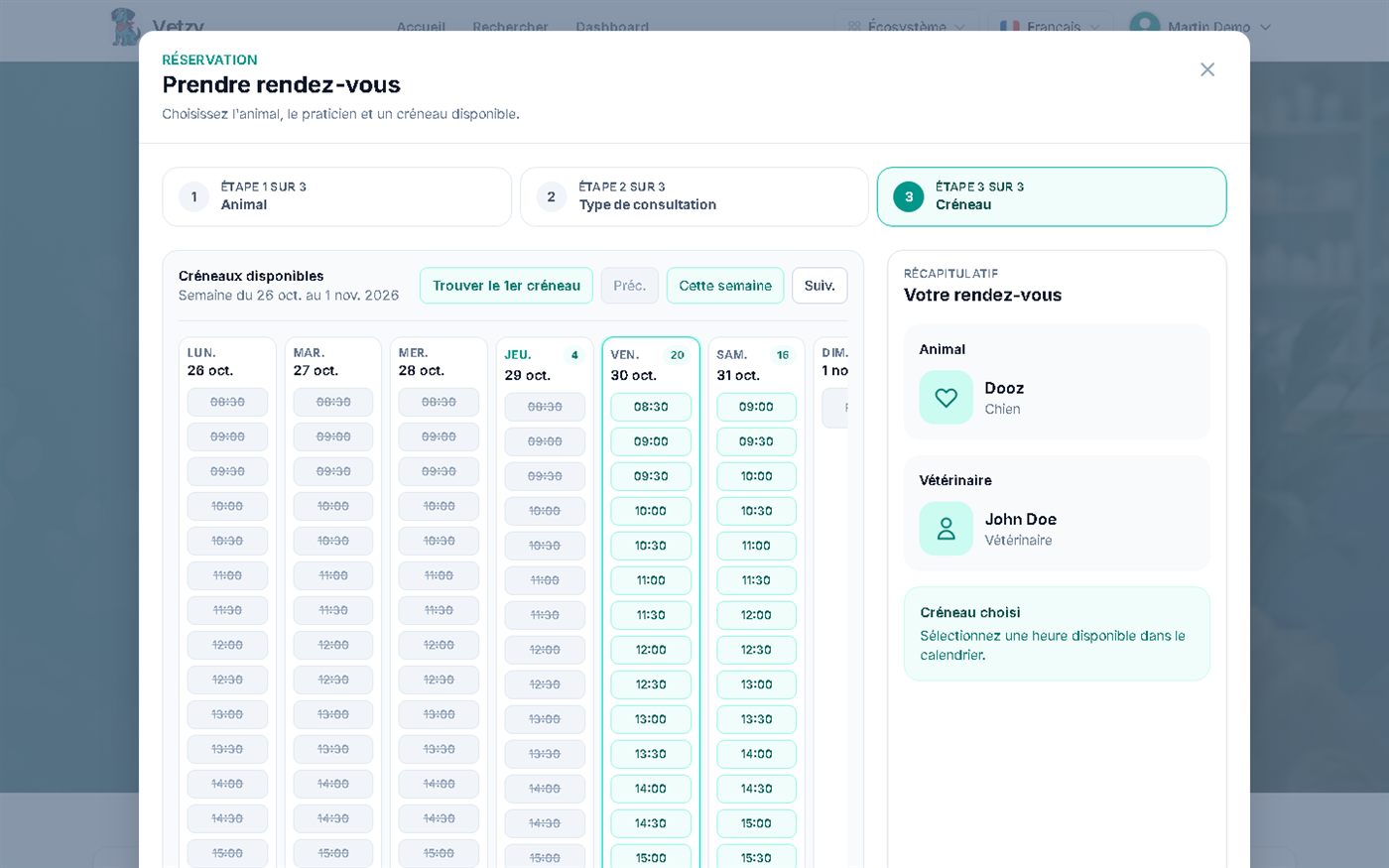
Markers on the screenshot
- 1"Find the first slot" jumps to the next free time
- 2Each day shows its number of available slots
- 3Struck-through times: past or already booked
- 4Free times: one click to choose
Screenshots of the app (demo data)
-
Step 5 · Owner
Confirm and receive the email
AvailableOnce you confirm the slot, a message confirms the booking and a confirmation email is sent to you. Depending on the vet's setting, the appointment is confirmed immediately or stays "pending" until they approve it.
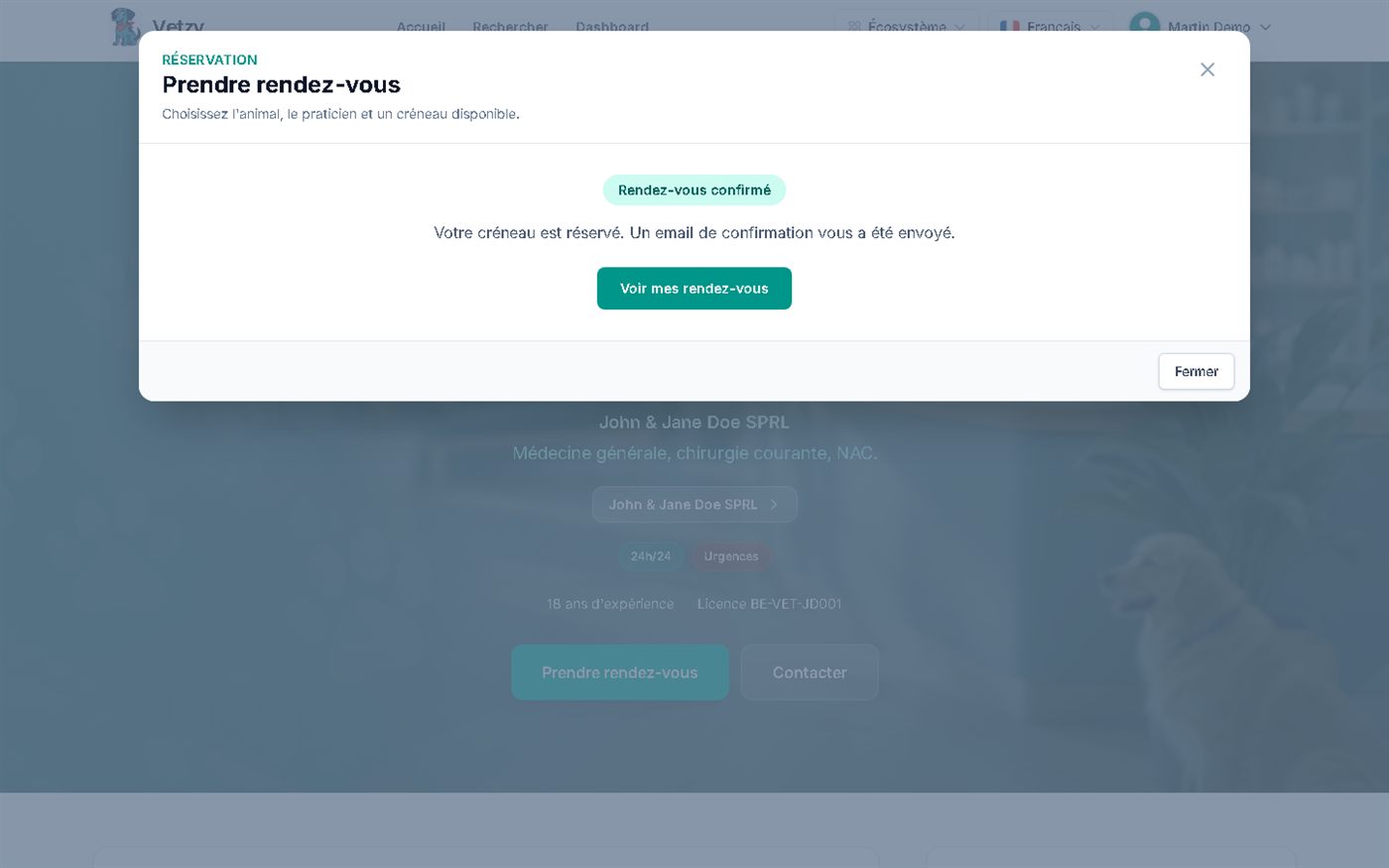
Markers on the screenshot
- 1Confirmation shown on screen
- 2Confirmation email sent
- 3Direct access to your appointments
Screenshots of the app (demo data)
-
Step 6 · Owner
Track, view and cancel if needed
AvailableMy appointments lists past and upcoming appointments, with the date, the animal, the vet and the status. You can cancel online as long as the minimum notice set by the vet is respected; after that, a message suggests you call the practice.
If the vet has enabled late-cancellation fees, they may apply after the notice period. You are told before you book.
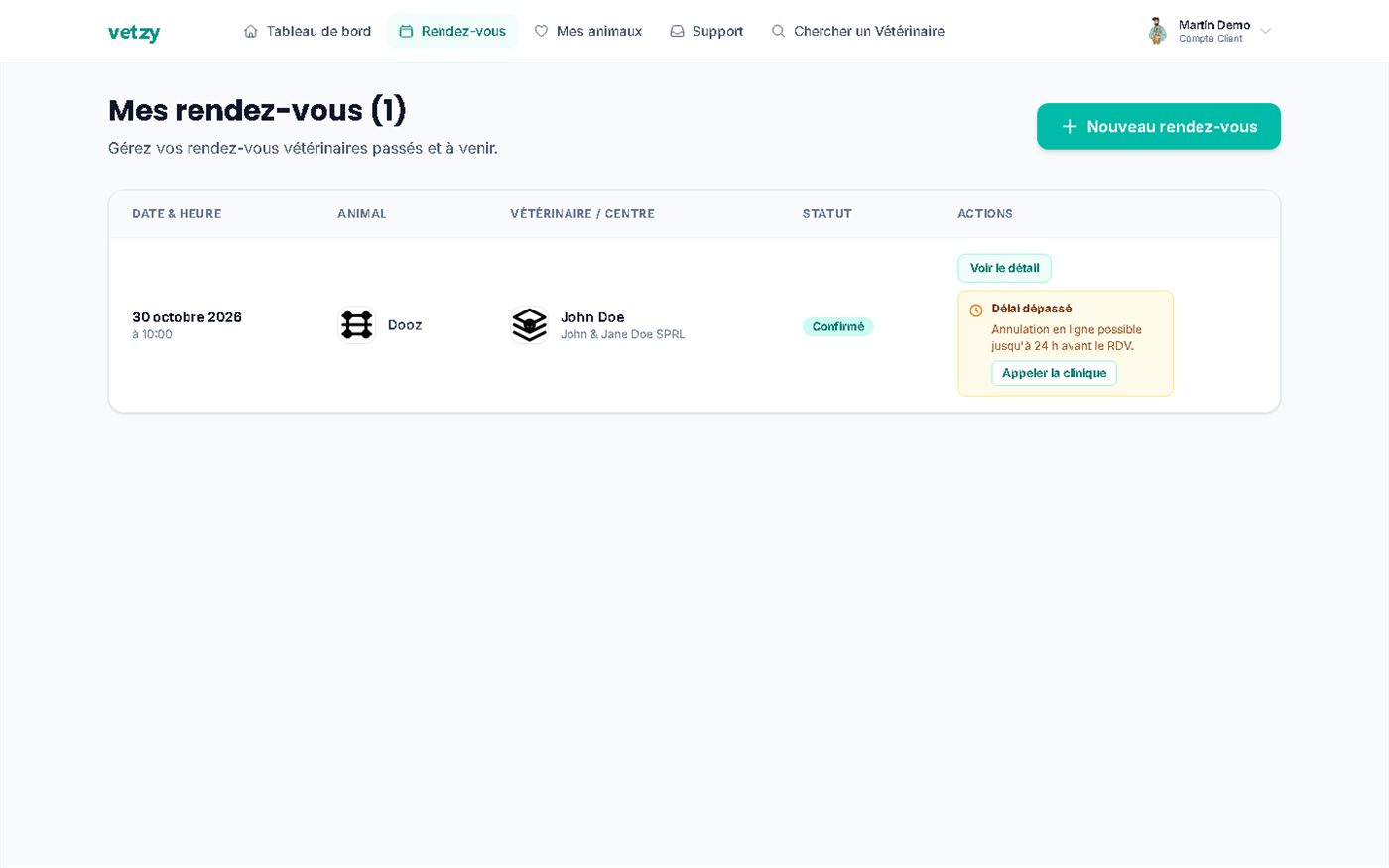
Markers on the screenshot
- 1Appointment status (confirmed, pending, cancelled)
- 2The vet's cancellation rule: here up to 24 hours before
- 3Appointment details
- 4New appointment for another need
Screenshots of the app (demo data)
Dashboard
After booking, your account keeps track of what comes next
Your pet's record brings together their health status, upcoming reminders and upcoming appointments in one place. A reminder can take you straight to booking.
- Upcoming and past appointments, with their status.
- Health reminders linked to your pet, with direct access to booking.
- Confirmation and reminder emails: preferences are set in your profile.
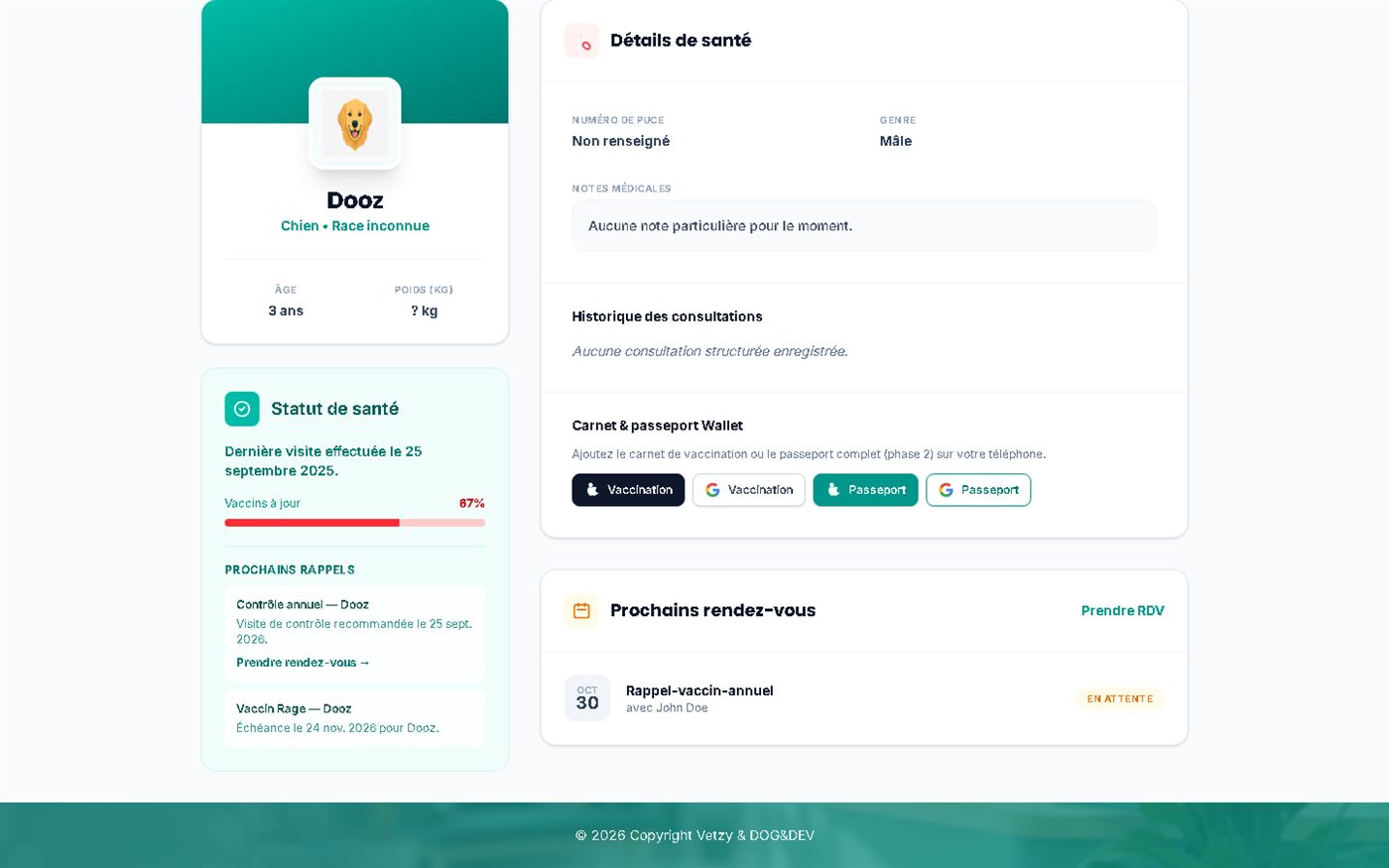
Markers on the screenshot
- 1Health status and last visit
- 2Upcoming reminders (check-up, vaccine)
- 3"Book an appointment" from a reminder
- 4Vaccination record to add to your phone
- 5Your pet's upcoming appointments
Screenshots of the app (demo data)
Booking by phone or online
| Today | With Vetzy | |
|---|---|---|
| Finding a time | Phone during opening hours, sometimes several times. | See the vet's free slots at any hour, from your phone. |
| Confirmation | Hope for a call back or a message to be sure. | A confirmation email and a status visible in My appointments. |
| Cancelling or changing | Phone the practice again and explain the situation. | Cancel online up to the notice period set by the vet. |
| Your pet's record | Paperwork to track down at every visit. | A record with health status, reminders and appointments. |
The cancellation notice, automatic confirmation and any fees depend on each vet.
A vaccine booster booked at 10 pm
Example built with the app's demo data: Martin wants to book his dog Dooz's annual vaccine booster, but the practice is closed.
-
22:05
He searches for a vet
He enters his town or city and sees the next free slot at each practice.
-
22:07
He chooses the appointment type
"Annual vaccine booster", with a one-line reason.
-
22:09
He selects Friday at 10:00
Times already taken are struck through; he clicks a free time.
-
22:10
He receives the confirmation
An email is sent to him and the appointment appears in My appointments.
-
Thursday
He checks his appointment
If he needs to cancel, he can do so online as long as the vet's notice period is respected.
Good to know
Preparing for your appointment
State the right reason
A clear reason (vaccine booster, limping, check-up) helps the vet prepare for the consultation and book the right length of time.
Have the health record to hand
Vaccine dates and current treatments are the most useful information to have ready.
Check the cancellation notice
It is shown in My appointments. If you are unsure, book early: you can cancel online as long as the notice period has not passed.
No slots?
The practice may not be bookable online, its calendar may be full, or your browser's time zone may be wrong. Widen the search area.
In an emergency (difficulty breathing, poisoning, heavy bleeding, seizures), phone an emergency clinic directly: online booking is not an emergency service.
Transparency
What exists today
-
Available
Online booking, at any hour
With vets who have booking open, with genuinely free slots and confirmation by email.
-
Available
Online cancellation
Possible up to the notice period set by the vet. After that, the app suggests phoning the practice.
-
Partial
Only one upcoming appointment per owner
In the current version of the app, an owner cannot have several upcoming appointments at the same time.
-
Partial
SMS reminders
Confirmations and reminders are sent by email. SMS can be enabled by Vetzy at the vet's request.
Frequently asked questions
Do I need to create an account?
An account lets you find your appointments and your pets' records in one place.
Can I cancel or move an appointment?
If you can no longer attend, tell the practice as early as possible so the slot can be freed up and another offered.
What about an emergency?
An emergency cannot be booked online: phone the practice or the on-call service for your area directly.
What should I do if no slots appear?
The professional may not be bookable online, their calendar may be full, or the browser's time zone may be wrong. "Directory" profiles can still be viewed for their contact details.
How do I cancel an appointment?
From My appointments, as long as the minimum notice set by the vet is respected. A confirmation email is sent to you. After that, phone the practice.
Is the appointment confirmed immediately?
It depends on the vet's setting: automatic confirmation, or a "pending" status until they approve it.
Related questions
Answers that complete this one, from your point of view and from the other side of the appointment.